magneticpole.com Software Gallery Forums Resume Games  
My own custom UI for Age of Mythology: The Titans.
  :: Games :: Age of Mythology :: User Interface


Pete's User Interface Modification:


Click here to download Pete's AOMx Configuration and User Interface.


Readme from PeteAOMxConfig.zip:

------------------------------------------------------------------------------
--      Pete's Age of Mythology Configuration and User Interface v3.0       --
------------------------------------------------------------------------------

!!!!!!!!!!!!!!!!!!!!!!!!!!!!!!!!!![ Notice ]!!!!!!!!!!!!!!!!!!!!!!!!!!!!!!!!!!
!! This interface is for use on and has only been tested with Age of        !!
!! Mythology WITH THE TITANS EXPANSION.  I make no guarantees as to what it !!
!! might do on a "vanilla" Age of Mythology install.                        !!
!!!!!!!!!!!!!!!!!!!!!!!!!!!!!!!!!!!!!!!!!!!!!!!!!!!!!!!!!!!!!!!!!!!!!!!!!!!!!!


-------------------------------=[ Installing ]=-------------------------------

The files in the directories correspond with the directories in your main "Age
of Mythology" executable folder.  Usually this is found in
"C:\Program Files\Microsoft Games\Age of Mythology".  So, the files in the
"data" directory of this zip file would go into the "data" directory of the
"Age of Mythology" folder.  If this is too complicated for you to do, you may
want to consider not using this interface.


----------------------------=[ What is it for? ]=-----------------------------

The purpose of these files was originally so that I could play a smoother game
of AOM than the standard interface allows.  I started playing with things by
looking at MicroSlave's (thanks ms!) original villie stats mod, and went from
there.  Before I knew it, MicroSlave had already completely redone the
interface himself, and posted it for others.  I took a quick look at it, and
incorporated a few neat ideas that he had in there (thanks again).  A few
people I know liked it, so I decided to release it upon the world.  In many
ways, I'm sure his interface is better than mine, though mine tries to stick
to a more "standard" feel, so that there is less adjustment when going from
the original interface to my own.  I'm not releasing mine as competition, but
just offering other options.  I like my own interface, you may like it too.


---------------------------------=[ Files ]=----------------------------------

[  \!PeteUI_Readme.txt  ]

You're reading this now, so I'd assume you know what it's for.


[  \data\uimain.xml  ]
[  \data\uimain.xmb  ]

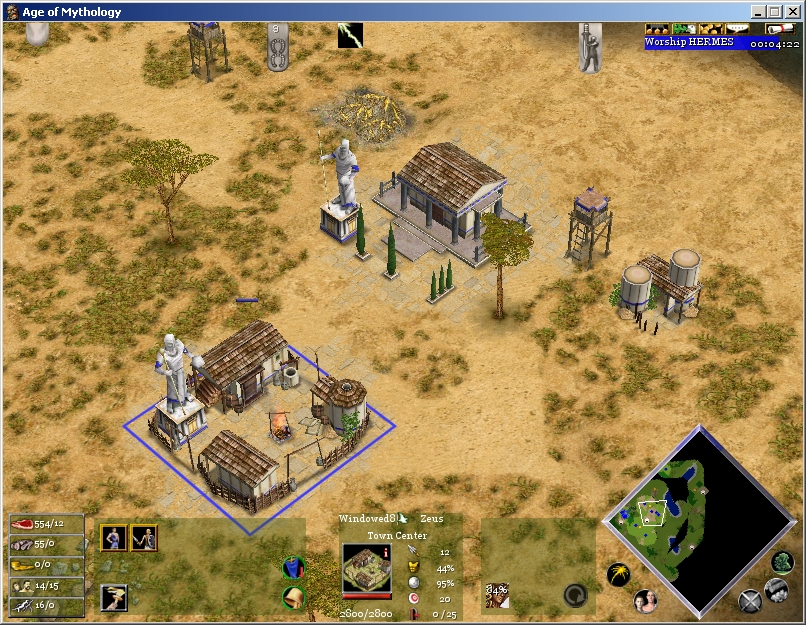
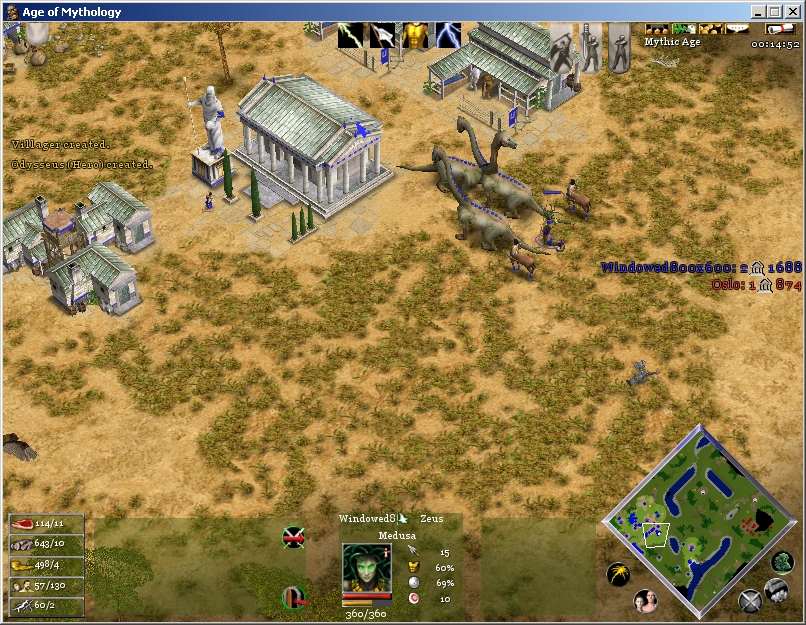
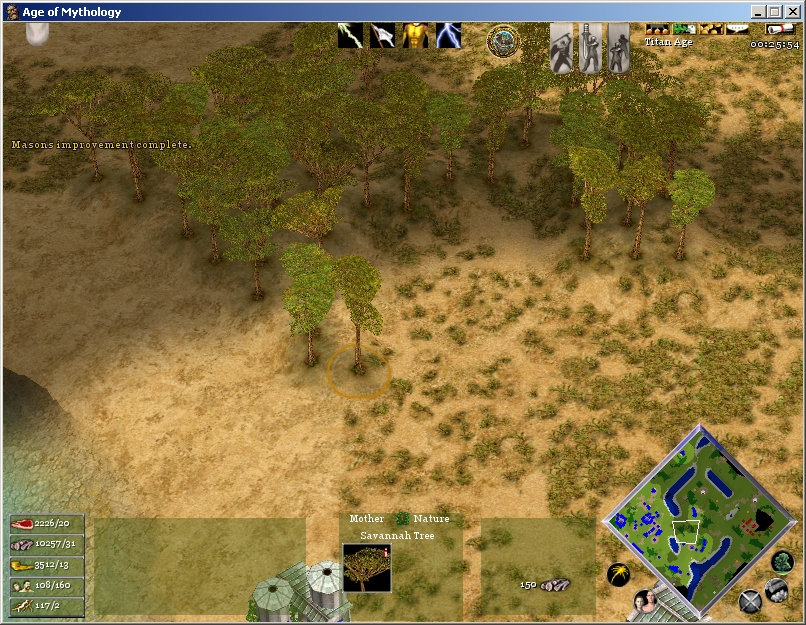
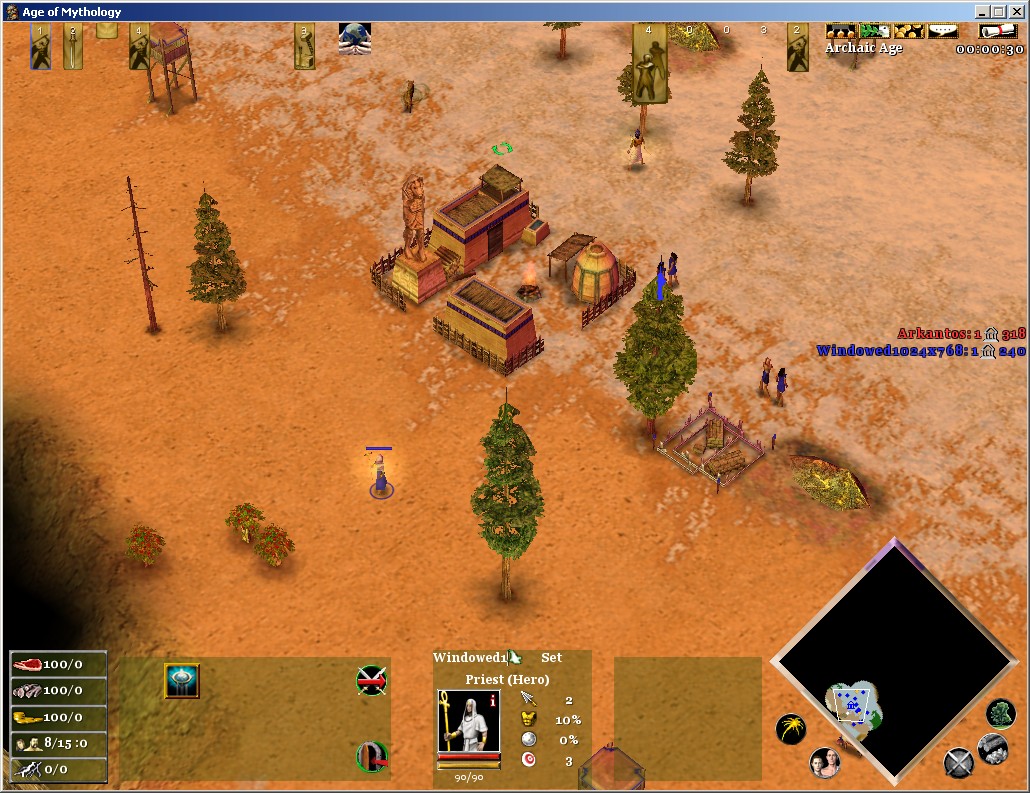
This file contains all of the changes for the main game interface (the one
that you see while you are playing the game).  Changes include:
-Most "pretty" user interface elements removed for a clean interface.
-God power buttons moved up and more out of the way.
-Titan gate icon put next to the god power buttons so you won't
 accidentally hit it.
-Game menu buttons moved up a little.
-Time moved to just under the game menu buttons to be more out of the way.
-Age progress bar moved to behind the time, again out of the way.
-Resources have a "/" followed by the number of villagers gathering from that
 resource.


[  \data\uipregamenew.xml  ]
[  \data\uipregamenew.xmb  ]

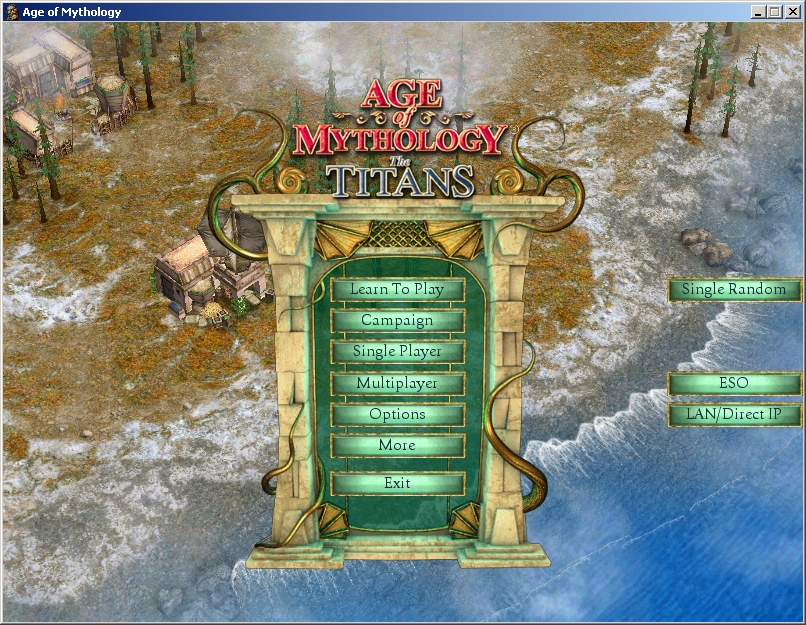
This file controls the main menu interface to the game, I just changed it to
have buttons on the main screen for the things that I do most: single player
random map, ESO, and LAN games.  Just a few less clicks when I want to play a
quick game (or test my ui changes).


[  \data\uimpsetupfinal.xml  ]
[  \data\uimpsetupfinal.xmb  ]

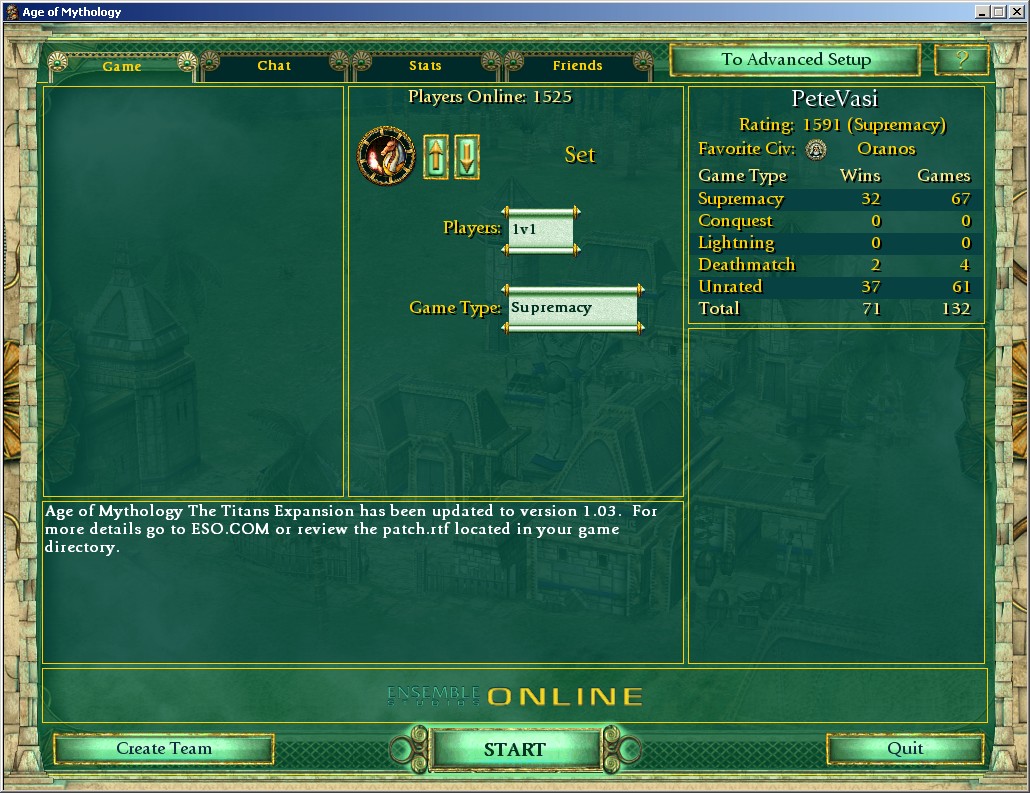
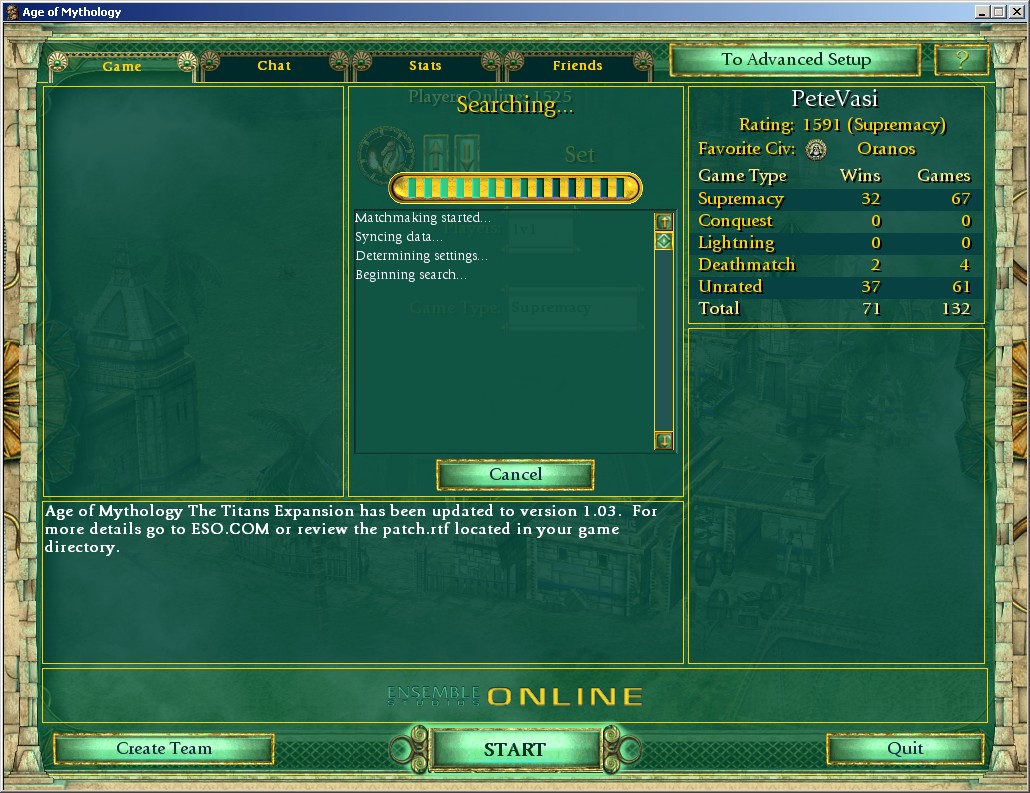
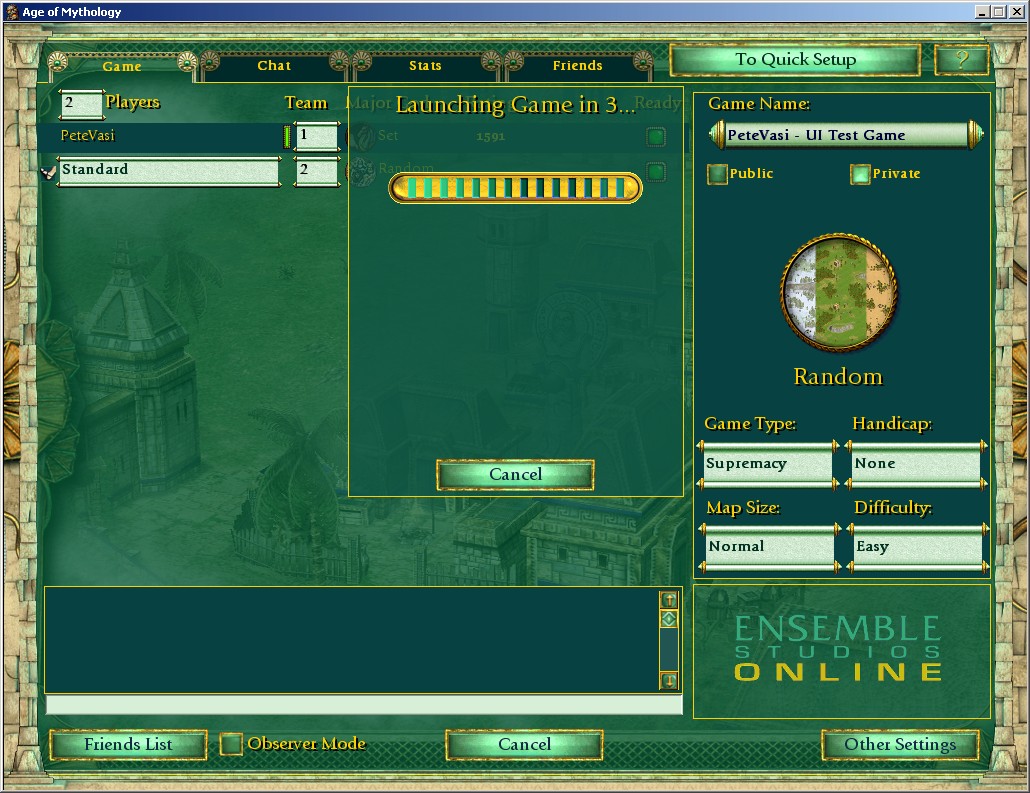
This file controls the interface to ESO and other multiplayer games.  It
allows you to chat while searching or starting a multiplayer game.


[  \data\uistrategicmap.xml  ]
[  \data\uistrategicmap.xmb  ]

This file controls the strategic map interface.  It's been made slightly
larger and moved to the left.


[  \startup\user.cfg  ]

The only thing in this file is a line so that the introductory cinematics do
not play.  Again, just to make the game start up a little faster.


[  \startup\backup.gamex.con  ]
[  \startup\gamex.con  ]
[  \startup\user.con  ]

These contain all of the shortcut keys that I use.  I would recommend
reading the user.con file yourself to see all of the keys.  If the keys do
not meet your needs, you will need to delete user.con, and rename
backup.gamex.con to gamex.con to return to AOM's original settings.


[  \textures\icons\command repeat off icon.ddt       ]
[  \textures\icons\command repeat on icon.ddt        ]
[  \textures\icons\command repeat rollover icon.ddt  ]

These files change the graphic for the "Auto-Queue" command button.  When
active, the button glows green, when inactive, the button is a dark grey.
When the mouse passes over it, the button glows red.  With these files
installed, I feel that it's much easier to tell at a quick glance whether or
not auto-queue is turned on for a building.


[  xpacklanguage.dll  ]

This file changes the tooltips to show much more detailed information.  These
tooltips were pioneered by Xentelian (distributed with permission) and you can
find the latest updates for them at: http://members.shaw.ca/markstrawson/
From his page, the description is as follows:
"This install shows specifics for the rollover help unit/tech
bonuses/penalties, non-average track ratings, fishing ship gather rates,
maximum units/buildings, healing rates, myth unit special attack recharge
time, Set animal conversion time, unit/building line of sight, unit training
times, tech research times, building build points (in some cases, exact build
times) and even god powers are more descriptive. The annoying messages showing
that a unit is built have been removed. Make sure you have rollover help
turned on in game options."


---------------=[ Screenshots, Updates, Information, Contact ]=---------------

All screenshots and updates to this interface will be stored on:
  http://pete.magneticpole.com/games/aom/
Visit there if you have any questions or comments.  I get notified when
comments are posted and will read them shortly.  If you need to contact me
privately, there is a link at the bottom of the above page to send me an
email.  I am also (rarely, but sometimes) found on ESO under the name
"PeteVasi".


--------------------------=[ Making Modifications ]=--------------------------

In most cases, I've left files as ".xml" files so that you can play with them
yourself.  Many include comments like "PV ADDED" or "PV MOD" with the original
line commented out so that you can see exactly what I have changed.  If you
come up with a great idea, feel free to send it back to me and maybe I'll
include it with the next release of my interface.  Just modifying the XML file
in the data directory will cause the XMB file to automatically be updated by
Age of Mythology.


--------------------------------=[ History ]=---------------------------------

[  Version 3.0  ]
-3.0 should be a big upgrade, but I ran out of 2.x numbers, and don't like
 "2.10", I think that's confusing...  So anyway, updated Xentelian's tooltips
 to version "March 11, 2005".

[  Version 2.9  ]
-Fixed normal startup script for non-Set Egyptians.
-Fixed mercanary hotkey.

[  Version 2.8  ]
-Changed startup scripts again...  The "Run Script" dialog can now be opened
 by either the "S" button in the lower right, or by pressing "Ctrl-Alt-S".
 As an added bonus, I've added a "Dwarf Build Startup" script for an all-dwarf
 build.

[  Version 2.7  ]
-Updated Xentelian's tooltips to version 1.03y.
-The startup script is now only activated by clicking the "A" and "S" buttons
 in the lower right.  "A" for Atlanteans, "S" for standard.  If you don't want
 a startup script, don't click the buttons.  The Atlantean one has been
 modified to show manors instead of houses in the population text line.

[  Version 2.6  ]
-Added uimpsetupfinal.* for better ESO controls.  It's not quite perfect, and
 I've left room so that I can add things later.  But it is an improvement over
 the old one.

[  Version 2.5  ]
-Added uistrategicmap.* for a slightly modified strategic map.  It's slightly
 larger and moved to the left.

[  Version 2.4  ]
-Slight change to the text at the top of uimain.xml for instructions on how to
 disable the startup script.  It's been tested and should actually work now.

[  Version 2.3  ]
-Took a few hints from Ekanta's UI to add the following (Thanks Ekanta!):
  -Number of houses, located with population.
  -Idle banners for: villagers, fishing ships, trade caravans, military units,
   and heroes, each with a count of how many are actually idle.  Also made the
   villagers one slightly bigger, as it's most important.
  -Slightly shrunk army hotkey number groupings.

[  Version 2.2  ]
-Added "Alt-Z" as flare hotkey.
-Changed startup script so I get slightly less confused on hotkeys.
-Updated Xentelian's tooltips to version 1.03x.

[  Version 2.1  ]
-Changed startup script to be more Set-friendly.

[  Version 2.0  ]
-Added Xentelian's tooltips, v1.03u.

[  Version 1.9  ]
-Bugfix for numpad Egyptian lumber hotkey.

[  Version 1.8  ]
-Added some new hotkeys, changed some others.
-Changed the startup script to hotkey the pharaoh and select the villagers.

[  Version 1.7  ]
-Added the multiplayer chat ability.

[  Version 1.6  ]
-Fixed it so that the "a" hotkey again allows Norse to attack-move.

[  Version 1.5  ]
-Changed startup script to (again) make the first scout hotkey 1, and the
 town center hotkey 9.

[  Version 1.4  ]
-Minor hotkey changes.

[  Version 1.3  ]
-Added the "Recorded Games" button to the main screen.  Handy.
-Added a whole bunch of hotkeys.  Read the "user.con" file for details.

[  Version 1.2  ]
-Included XMBs in release to fix some clients not being able to use the UI.

[  Version 1.1  ]
-First public release
-Added back the recharge bar that shows a unit's special ability recharge.
-Moved some hidden panels around to allow you to select units near the
 borders of the screen.

[  Version 1.0  ]
-Initial testing release used just by a few friends.


---------------------------------=[ Thanks ]=---------------------------------

A few notes of thanks:
-Thanks MicroSlave, your interface has great ideas in it.  Keep it up.  And
 feel free to browse through mine if there's anything worthwhile in there.
-Thanks ES.  Data-driven engines rock.  Whoever decided that that was the
 model to follow for AOM gets a gold star from another programmer.


--------------------------------=[ Warranty ]=--------------------------------

No warranty of any kind, express or implied, is intended for any part of this
package.  There are no guarantees.  If you happen to screw up your Age of
Mythology due to trying to install this package, it is your own fault.

Screenshots from Version 1.1:


This shows the main menu with the extra buttons.

This shows what the progress bar in the upper right looks like. You can also see the redone auto-queue button that is clearer.

Recharge bar.

The small, relocated Titan button.

Screenshots from Version 2.6:


The main UI.

The interface to ESO.

How ESO looks while you're searching for a game.

How the screen looks while launching an advanced setup/LAN game.

Additional Files That I Use:


Xentelian's Tools - Tooltips for a nice guide to unit stats while you're in the game, detailed stats in Excel, hotkeys, and other game mods.
Ekanta's User Interface - If you're looking for a different user interface, based off of my own, check out Ekanta's.

Comments on Pete's AOM UI

trismegiste


(slimang@_____)

2004-02-10 01:03:28


(#0)

Thanks pete, Great and works fine ... Would it be possible to translate into French? I could help you has to translate each words.... Have a good day


Peter Vasiliauskas


(comments@_____)

2004-02-21 11:02:59


(#2)

Well, I've distributed the files as xml, so you can just edit them yourself with the French text. Just open them up in notepad, and do a text search for the English version of the words/phrases that you want to translate.


A S T R O


(spartako_heroe@_____)

2008-03-04 19:27:18


(#53)

QUIZAS ME PUEDAN AYUDAR ESTOY ATASCADO EN PONER ALGUNAS NUEVAS UNIDADES EN MI JUEGO Y ES LOS ELVISH ARCHES , DRUIDA , ANUBITE SUS CREADORES INDICAN QUE HAY QUE EDITAR ESOS ARCHIVOS MODIFICANDOLOS ALGUNOS A XML YA LO HICE Y AVANCE HASTA COMVERSION A XMB EL PROBLEMA ES QUE CUANDO EXTRAI LOS ARCHIVOS DE LA DATA.BAR SALIO EL PROTO.X Y VARIOS ARCHIVOS ENTRE ELLOS LA THRECC LO QUE NO EXPLICAN ES TODOS ESOS ARCHIVOS Y LOS MODIFICADOS COMO LOS PUEDO VOLVER A METER DENTRO DE LA DATA.BAR PARA ASI CAMBIARLA POR LA ORIGINAL QUE ESTA EN MI JUEGO YA QUE VARIAS VECES TUVE QUE DESINTALAR EL JUEGO Y VOLVERLO A INSTALAR PARA EVITAR ELLO ABRI UNA CARPETA NUEVA Y PEGUE ALLI LA DATA.BAR E HICE LA MISMA OPERACION PERO AHORA NO SE COMO VUELVO A METER LA PROTO DENTRO DE LA DATA.BAR Y JUSTO POE ESO ME SALIO OTRO PROBLEMA TRATE DE ABRIR LA DATA.BAR COM OTRO PROGRAMA PARA REVISARLA PERO HA PASADO QUE SU ICONO A CAMBIADO Y EN MI PC NO ENCUENTRO ALGUN PROGRAMA PARA DEVOLVERLA A SU APARIENCIA ORIGINAL ME PUEDEN ENVIAR CUALQUIER TIPO DE INFORMACION AL RESPECTO EN CUALQUIER IDIOMA YO LO TRADUCIRE VIA GOOGLE CON EL SOTWARE EN LINEA DE MI MUNDO TRADUCTOR PORQUE YO HABLO ESPAÑOL


A S T R O


(spartako_heroe@_____)

2008-03-04 19:32:31


(#54)

PROBABLY COULD HELP ME I AM CLOGGED IN PUTTING SOME NEW UNITS IN MY GAME AND IT IS THE ELVISH ARCHES, DRUID, ANUBITE HIS(HER,YOUR) CREATORS INDICATE THAT IT IS NECESSARY TO EDIT THESE FILES MODIFYING SOME TO XML ALREADY I DID IT AND ADVANCE UP TO COMVERSION TO XMB THE PROBLEM IS THAT WHEN EXTRAI THE FILES OF THE DATA.BAR SALIO THE PROTO.X AND SEVERAL FILES BETWEEN(AMONG) THEM THE THRECC WHAT THEY DO NOT EXPLAIN IS ALL THESE FILES AND THE MODIFIED ONES LIKE THEM I CAN RETURN TO PUT INSIDE THE DATA.BAR THIS WAY TO CHANGE IT INTO THE ORIGINAL ONE THAT THIS IN MY GAME SINCE YOU CHANGE TIMES I HAD THAT DESINTALAR THE GAME AND TO RETURN TO INSTALL TO AVOID IT ABRI A NEW FOLDER AND STUCK THERE THE DATA.BAR And I DID THE SAME OPERATION BUT NOW I DO NOT KNOW SINCE(AS,LIKE) I RETURN TO PUT THE PROTO INSIDE THE DATA.BAR AND JUST PERSON POE IT SALIO ANOTHER PROBLEM TRIES TO OPEN THE DATA.BAR COM ANOTHER PROGRAM TO CHECK HER BUT IT(HE,SHE) HAS HAPPENED(PASSED) THAT HIS(HER,YOUR) ICON TO CHANGED AND IN MY PC I DO NOT FIND ALGUN PROGRAMMES TO RETURN IT TO HIS(HER,YOUR) ORIGINAL APPEARANCE THEY CAN SEND ANY TYPE OF INFORMATION IN THE MATTER IN ANY LANGUAGE I TRADUCIRE ROUTE GOOGLE WITH THE SOTWARE IN LINE OF MY WORLD TRANSLATOR BECAUSE I SPEAK SPANISH MY E-MAIL IS: spartako_heroe@hotmail.com or heroe_astro@yahoo.com gratzie!!!!!!!

ONM_ThoMeuhGal


(francois_berthold@_____)

2004-02-10 18:02:51


(#1)

HI Pete! I like your UI a lot, but i found some little mistake in the readme file. In fact the uimain and uipregamenew files you give in the data folder are .xml files, but we have to rename it in .xmb to be able to use it. You don't mention this in your readme. So youy could add this text (it's just an exemple ) at the beginning of the installing part in the readme: Before installing this interface, rename the "uimain" and "uipregamenew" files in .xmb instead of .xml. To do that open them in your notepad. Save them as uimain.xmb or uipregamenew.xmb, and choose "all files" instead of "text file". Save it and continue the installation process using those rename files in th data folder (instead of .xml ones). It would be a bit more clear I think... But nice job guy! ++


Peter Vasiliauskas


(comments@_____)

2004-02-21 11:07:24


(#3)

Actually, you can just drop the xml files in place, you shouldn't have to rename them to xmb or anything. At least that works for my system. AOM itself will make compressed xmb files out of the xml files that it finds. Anyone else having this issue?

Ekanta


2004-03-06 12:44:51


(#4)

Is there a way to manipulate the semi-transparent backgrounds? Comparing to microslaves ui I mean. Micro has an option for this. But then again, in micros ui the myth units recharge bar dont work. Just wondering, as for now I think both of these options would be nice: reacharge bar working + option for semi-transparent/total transparent backgrounds.


Peter Vasiliauskas


(comments@_____)

2004-03-06 14:43:16


(#5)

It's not currently an option, but you could edit the uimain.xml file yourself and take them out. Find items with a backgroundcolor="131 151 68", and remove them.

Ekanta


2004-03-06 15:59:01


(#6)

thanks for everything

Ekanta


2004-03-06 18:54:54


(#7)

Well since I have nothing bettter to do at the moment. Just some thoughts, if u wanted to create a new banner for idle villager and fishing boats separately, how would u name them? I know the hotkeys are: Villagers (Only): uiFindIdleType("AbstractVillager") Fishing Boats (only): uiFindIdleType("UtilityShip") But in your ui there are only all idle civilians put together? <gadget name="idleBanner" type="idleBanner" size1024="772 0 802 66" donthighlight="" mouseovertext="$$18393$$Click on this banner to find your {numIdle(AbstractVillager)} Idle Villagers. " idletype="LogicalTypeIdleCivilian" bannerproto="UI Idle Villager Banner" z="15"></gadget> I was mostly wondering what this stands for: $$18393$$ I suspect it gets the information about number of idles right? but what would the number be then for idle villager and idle fishing seprarately? and this: bannerproto="UI Idle Villager Banner" Is this a name for an existing banner? and if so, is there another name for a fish only idle banner? (By the way, I managed to change the transparentness well, but kept it on the resource bar )


Peter Vasiliauskas


(comments@_____)

2004-03-06 19:29:26


(#8)

Your welcome.

The ui works a little different from the hotkeys, but similar. I'm guessing that replacing the idletype="LogicalTypeIdleCivilian" with idletype="UtilityShip" will cause the banner to look for just fishing ships.

The $$18393$$ text is pulled from the xpacklanguage.dll resource ID. If that text is found, it will be used instead of the text currently listed in the XML. You can remove it to display your own text. Usually, it's contents are identical to the text that follows it.

The bannerproto most likely refers to the UI graphics file to use as an icon. You'll want to use aomed to pull all the icons out of textures2.bar (I think), and look to see if there's an image that suits you.

Happy editing, let us know if you come up with something good.

Ekanta


2004-03-07 07:24:01


(#9)

noobie question: how on earth to u open those files, like the "textures2.bar" so it displays some reasonable texts?


Peter Vasiliauskas


(comments@_____)

2004-03-07 10:29:45


(#10)

Find a utility called "aomed". It will let you extract files from the .bar files, as well as convert .xmb files to .xml and .ddt files to .bmp.


Zabojca


(vader_42@_____)

2004-03-21 19:00:18


(#21)

Actually I'm having a similar problem. When I placed the two above mentioned files in the folders they do nothing. But when I change them to .xmb files they work...kind of. I actually loose all of my toolbars, age advance bar (ie; everything is gone except the units and buildings really), etc and the game crashes. Any suggestions? Thanks for the help and all the work.


Zabojca


(vader_42@_____)

2004-03-21 19:08:42


(#22)

Actually I'm having a similar problem. When I placed the two above mentioned files in the folders they do nothing. But when I change them to .xmb files they work...kind of. I actually loose all of my toolbars, age advance bar (ie; everything is gone except the units and buildings really), etc and the game crashes. Any suggestions? Thanks for the help and all the work.

Ekanta


2004-03-08 16:12:17


(#11)

Hey, I manage to make the idle icons a bit small and include idle fish icon. Under these icons I made a small number to show exactly how many idles u have of every kind. same as it shows how many u got on every resource. kind of nice!

GRR_Moi


2004-03-11 17:49:00


(#12)

Sorry, cannot make it work :/ i feel stupid. I love the previews, i dowloaded it, unziped it, looked for the files that needed to be in data, they were there, but then, nothing exept for the "no cinematcis" part. My Uimain and other Ui must have a problem sowhere ...

Alex


(alex_88_2k5@_____)

2004-03-12 17:40:02


(#13)

I am very bad with computers so i have a few questions. First off where exactly do i put the files that i downloaded from this site into? Also i see that u have made a hotkey for autoque. How can i change this button to the spacebar for auto que hotkey? How do i seperate idle villies from idle fishing boats? It says up there that press **** to change map. I can press those buttons with this installed and change a map that eso has randomly given me? Also, i always have to press Alt-f4 and then press YES i want to quit. How can i make this faster and easier to exit. Thanks and your reply anmd help means alot.

Partizan


2004-03-13 22:26:10


(#14)

hey just installed ur tool very cool but for some reason my delete key doesnt work anymore so i can delet units or structures. any ideas whats wrong?


allen brubaker


2004-03-13 22:46:05


(#16)

duh... he changed it in the user.con file.. you have to press shift-delete

Allen Brubaker


(Verythaiguy@_____)

2004-03-13 22:41:49


(#15)

hey can you please email me back at verythaiguy@comcast.net is there a way to modify or put a command into the user.con file that lets you zoom further than it currently allowed .. if i use the minus key and zoom out to the furthest possible, that i would be able to zoom out further than is currently allowed with the default setup when maxed out

Steel-Blade


(ice__flame@_____)

2004-03-14 06:32:21


(#17)

Hey pete, u think u can add a caravan counter? It would be great to know how much u have with out having to count them. If you know how to do it but u dont want to included in your project, u think u could tell me what do i must add in the uimain.xml ? It would be great if you could do that. Regards p.s Keep up the good work

ES


2004-03-14 15:22:06


(#18)

Mr Allen Brubaker, that is cheating! This was made impossible in a patch some time ago, dont ask poor old Pete to do a hack.


Allen Brubaker


(verythaiguy@_____)

2004-03-27 10:49:06


(#23)

??? hows it cheating???


Peter Vasiliauskas


(comments@_____)

2004-04-05 21:29:42


(#25)

Being able to see more of the map at once than your opponent is considered an unfair advantage. The modified UI is not considered cheating (in my opinion), as any user can use the "basic" minimized interface by pressing Ctrl-Down.

Pleiadians


(g04tr4ncer@_____)

2004-03-14 20:43:23


(#19)

nice work Pete !
I prefer MicroSlave's one although you put some nice ideas here and I felt free to add them manually I liked the idea of the toggleAutoQueue buttons as well as adding scout to a group at startup etc.. thx !

I have a few questions though : is there a way to find out every available types of units (abstractInfantry, HumanUnit etc..), function names (uiFindUnit) and available properties for "gadget" objetcs ? maybe you 've extracted a data file or you found them manually ? For example, what is "z" property for ? There's one annoying bug in microslave's mod, the MU special attack recharge bar has disappeared.. but I saw you managed to make it visible again... any tip how you did that please ? (I 've lurked in your code but I didn't find it)

I liked your idea Ekanta.. I did the same but does the number of idle units disappear when the banner disappears too ? I've tried a lot but I didn't succeed.

I wanted to say more but that's all I can remember now... Thanks guys Cya

Ekanta


2004-03-14 20:57:15


(#20)

hi pleiadians! U hit it right on there, idle numbers dont follow idle icons, there just stay there on screen, kind of annoying. But look at unitpanel! the info in there comes and goes with pannel, why? Cant be that hard to figure out! soon maybe...

Peter Vasiliauskas


(comments@_____)

2004-04-05 21:27:56


(#24)

Ok, to all of those that couldn't get the version 1.1 to work, I've included some XMB files in version 1.2, so it should work better. Download and enjoy.

VALI


2004-04-18 02:11:36


(#26)

PLEASE HELP ME ! WHAT MUST I BUILD WHEN THE GAME ASK ME TO BUILD THREE ROCS AND SENT IT TO KASTOR?


Kastor


2004-07-13 07:00:53


(#37)

Duh! How about you BUILD THREE ROCS AND SENT IT TO KASTOR?


Arthur


2005-10-30 06:13:44


(#46)

How do I build these Rocs. Dont see any such option in the list available. If anyone has found a way pls share it across


Arthur


2005-10-30 06:19:50


(#47)

How do I build these Rocs. Dont see any such option in the list available. If anyone has found a way pls share it across


Cadu


2006-05-20 12:17:05


(#50)

Roc is a transport bird !!! you must build three of them !!! in your temple you find the option to construct them... good play !!!

Pagh


(pagh@_____)

2004-04-30 08:54:06


(#27)

Hi Pete!
Great job to you, and to Ekanta. I played a little with both of your uimain.xml, and found it was very usefull actually .

I am trying to make a few gadgets to show and select military units, just like the ones Ekanta and MicroSlave made for military buildings (sometimes i have a hard time finding my Pharaoh(s), Military ships and so on).

So far i have only been able to show idle military units, like "numIdle{Spearman}", how do I include non-idle units?

Also, do you know if it is possible to select all units/buildings of a certain type, like when you are doubleclicking a unit/building? I have tried to use the command "uiDoubleClickSelect(0)", but that just selects what's currently underneath the mousecursor .

And finally, like Pleiadians wrote, where do you find the available functions like uiFindUnit, numGatheres, numIdle etc.? I have tried to search all xml files (after extracting them from data.bar, data2.bar, textures.bar and textures2.bar), without any luck.

I hope you, or someone else reading this, can help.

Thanx a lot.


Peter Vasiliauskas


(comments@_____)

2004-05-01 09:41:00


(#28)

Unfortunately, there isn't a function that I have found that is able to show the total number of units. I've even gone as far as running AOM in a debugger and pulling out every known function name.

As for selecting all buildings of a certain type, I haven't found a terribly easy way to do it, however, I have a sort-of workaround in my new (1.3) hotkeys that I just uploaded yesterday. Download the new version, and take a look in user.con. There's a section there that uses "control-shift-a" to select a building and add it to a hidden "0" group. You can keep pushing the key to select all of your buildings of that type and keep adding them to the group. You can also add other types of buildings in if you're doing something like setting a common waypoint. You then can use "0" to recall that group 0, or use "-" to clear it. Not a perfect solution, but workable.

marko


2004-05-19 10:12:27


(#29)

I select all three barracks holding shift key and then press ctrl-5 to add them to key 5.

Xentelian


(markstrawson@_____)

2004-08-10 09:48:16


(#38)

Any idea how to toggle{mygadget} at the same time unitstatpanel is turned on/off. It seems to be called from something other than uimain.xml but I am unable to find it. I am trying to put in LOS, trainpoints, and buildpoints gadget, but I want to link it with unitstatpanel when it comes up/goes away.

Xentelian


(markstrawson@_____)

2004-10-02 03:03:40


(#40)

The recorded game renamer program you made... Pretty awesome Pete! Definitely add your link to my site. See you have my tooltips on yours - thx Was happy to see that it works for .rec and .rcx files as long as correct directory for either savegame folder is used.

Ekanta


2004-11-30 15:35:55


(#41)

hey, Got myth recharge to work even when I minimize ingame. I think I know what the story is now. What goes into statspanel are triggered from another location, and the command "uiMini(Maxi)mizeMainBackground" (same as ctrl-arrowdown(up) ) triggers myth recharge off together with age up mask and statspanel. If we define the mini(maxi) process ourselves those triggers wont be activated. The reason it never worked in microslaves ui is that he minimized it in startupscript and hence lost the myth rechargebar. The reason it work in your ui for example is that you never minimized it, you took out the maxed decorations so it would "look" minimized from start. In my ESanta version I changed the name of the maxed decorations and made a new command, and thus could minimize/maximize without involving those triggers. Well, thought I say it since its been bugging me for a long time. Over and out.

romaithi


(alromaithi200@_____)

2005-02-07 06:27:24


(#42)

Hi Pete, Acutly, i really like your prgrame, thank alot man, i was trying to find a usfel tool and i found this. it's even greater than i thought. However, i have one problom, I am very satifaied with all kind of helps. but I'd like to take one advantage from your programe. i mean i want to put everthing except the the fram i mean the prograss file. i just want to leave it as it is. so what the the files i want to take it out to return it as the old fram as the old way. ( the second picture you put it in the forums) again, thanks alot for the time you spent it to make this wonderful great programe. Many thanks, H.Al-Romaithi

BiggRed


(Biggred_19@_____)

2005-03-10 18:37:16


(#43)

How do u fix the delete key to return to it's orginal form or how do u use it with your program i know u add something to make it so no more accidental tc deletion would happen. Thanks

treegs


(diescreaming666@_____)

2005-04-24 19:38:32


(#44)

i have a problem with a file on the AoM game, everything installs properly except for the textures.bar file. when i try and play the game evrything is messed up. does anyone know where i might be able to download a replacement for the file or does anyone have a solution for this problem?

ThorKiller


2005-06-12 18:28:10


(#45)

x I need a UI with the idle villager on resource bar, but without aq on and 1 click for change the UI.

John Carmack


2006-02-18 12:36:32


(#48)

Tienen alguna UI en español disponible para bajar? O alguna traducción. Gracias.

wrazor


(ash_ish86@_____)

2006-03-28 09:07:50


(#49)

hey pete great job i just wanna ask how do u disable scroll down of messages when pressing page up key. Coz i use page up and page down keys as my hotkeys.

Mizuno


2006-09-11 23:20:04


(#51)

i would like to say that i'm a gay and i love ONU_Thunder!

Edward


2007-10-28 20:34:25


(#52)

I haven't installed AOM because at 65% it says it cant find Texture.bar so what do i do if i didnt install it?

Anubis


2008-11-25 07:01:23


(#55)

I m looking for Sim of mythology 1.41 or 1.42. Can you help me to find it ?

NeOtron


(phoenix_blogger@_____)

2009-09-27 15:03:12


(#56)

hi pete. u did a great job. i used to play with ekanta's ui but today i found ur's i was impressed by the amount of info ur ui gives. but as i m addicted to ekanta's ui i somewhat mixed both uis i inculuded ekanta's marketing tab , damageflashbars , frndfoecolor etc etc tou r ui and now i think my ui is nearly perfect... thanks to both of u

Johan


2010-03-13 22:46:57


(#57)

I love you. :D


Johan


2010-03-13 22:48:25


(#58)

Not in that freaky gay kind of way though...

Add to "Comments on Pete's AOM UI"

Your Name:

Your E-mail (optional):


Allow anyone to email you?

Note: No one will be able to see your email address unless you choose to reply to their email.

In reply to comment:


Your Comment:


(Allowed HTML: <br> <font> <b> <i> <a> <tt> [&emoticons] )